Check a phone number.
See what’s behind it.
Enter a number with its country code. Review its validation result before using it in a signup flow, contact record or campaign.
Phone Validator
Free check · No signup required
Include the country code, such as +1 for the US and Canada, or pick the country from the list.
Every check returns- Validity
- Line type
- Carrier
- Location
- Risk score
What a phone number check tells you.
Use each field for its own purpose.
Phone number validation
Check number structure and validation signals. Get a result you can use to accept, correct or review a contact.
Try the phone validatorLine type detection
Distinguish mobile, landline, VoIP, toll-free and premium-rate numbers before choosing a contact channel.
Check a line typeCarrier lookup
Add available carrier information to your phone records for routing and segmentation.
Look up a carrierCheck the number, then read its available details.
Separate number structure from additional validation signals and any ownership checks.
- 01
Prepare input
Include the country calling code and avoid attaching names or unrelated personal details.
A consistent international input removes ambiguity.
- 02
Read the verdict
Inspect the validation status and any returned explanations.
A positive result is a snapshot, not a delivery guarantee.
- 03
Choose the next step
Correct invalid input, review uncertain signals or continue your normal process.
Keep consent and ownership checks separate.
What the result can and cannot establish.
Use the data as one part of a contact workflow.
Clear data practices. Clear responsibilities.
Review how SPV describes customer-data processing before introducing it into your workflow.
Your numbers.
Your processing purpose.
SPV’s published policy states it processes submitted data to deliver the requested service and does not sell submitted personal information.
Read the privacy policyPrivacy and data protection
The policy addresses GDPR and UK GDPR, data-subject rights and international transfers. Customers remain responsible for their lawful basis for processing.
Retention and security
Retention varies by purpose and legal requirements. Review the published policy and ask the team for retention periods and the controls relevant to your deployment.
Validation and outreach consent
A valid number does not establish permission to call or text. Apply your consent, suppression and channel-specific checks separately.
What a lookup looks like in your account.
Real screens from the app, shown with sample data.
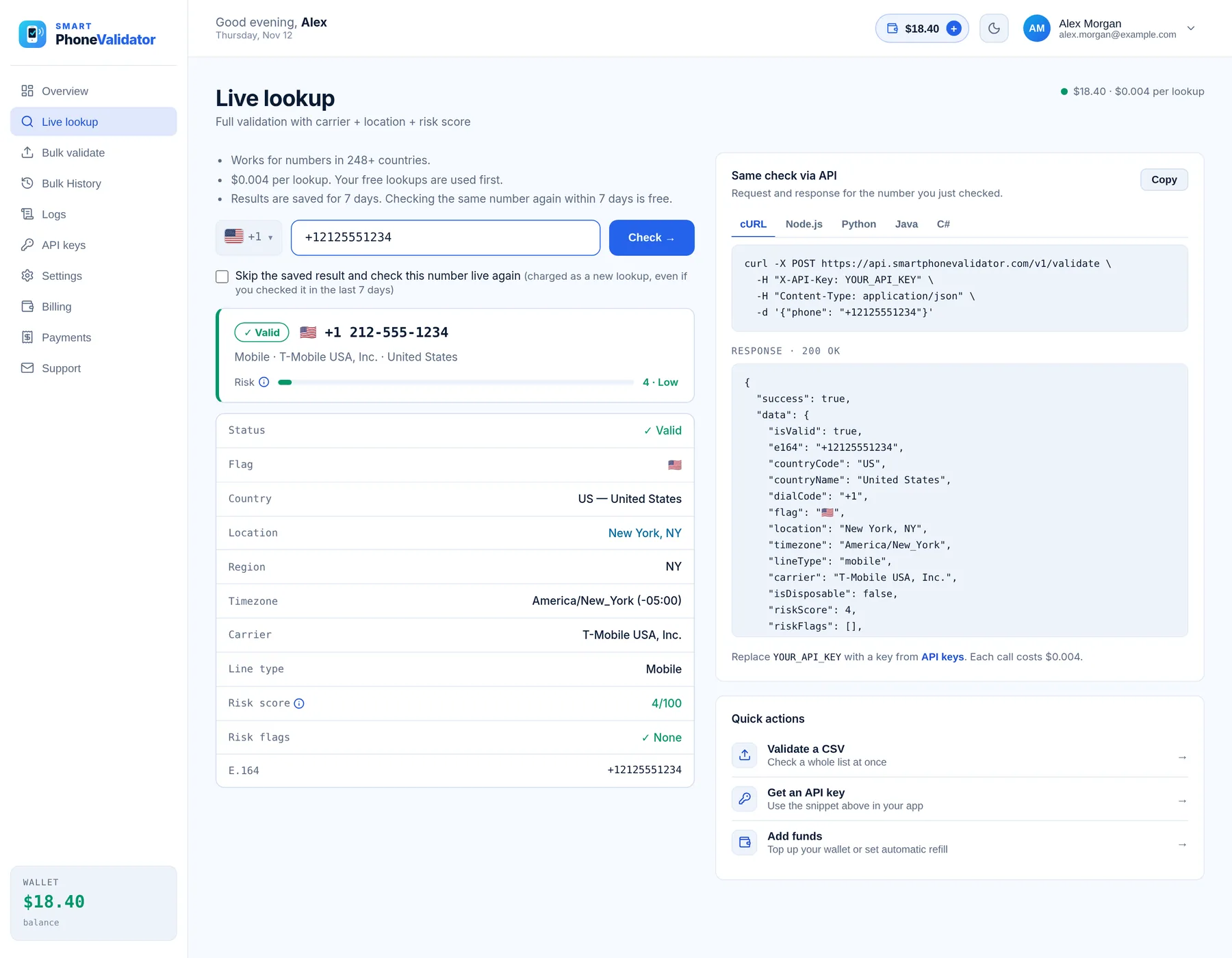
- Status shown as Valid, Risky or Invalid, with a 0–100 risk score and its flags
- Country, region, timezone, carrier, line type and the E.164 number
- The same check as a ready-to-copy API request, in cURL, Node.js, Python, Java or C#
- $0.004 per lookup; checking the same number again within 7 days is free
Direct answers to your questions.
Find the practical details for this page.
Is this phone number validator free?
SPV advertises limited free individual checks and 100 free lookups for new accounts.
Does a valid number confirm the owner?
No. Use a separate ownership verification step when needed.
Can validation prove that SMS will arrive?
No. Channel support and network conditions still affect delivery.
What should I enter into the checker?
Enter a phone number with its country calling code, such as an international +code format.
What does an invalid result mean?
The number failed available checks. Review the reason and ask for correction where appropriate.
Can I check a CSV or Excel file instead?
Yes. Use the bulk validator through an SPV account. It takes CSV and Excel (.xlsx) files.
Start with the numbers you have.
Check a single number, clean a contact list, or add validation to your app.